Must-Have Safari Extensions for Productivity on Mac
Safari is fast, private and easy on a MacBook's battery, and its extension library now covers most of what people used to switch to Chrome for. Here are the Safari extensions worth installing for everyday productivity, led by SimpleFill for anyone who types the same text or fills the same forms, with what each one fixes and what it costs. Most come from the Mac App Store, and you turn them on in Safari's Settings under Extensions.
1. SimpleFill
SimpleFill is a text expander, form filler and AI writing assistant in one Safari extension (also available for Chrome, Firefox and Edge). Type a short shortcut to insert anything you've saved, from your email address to a fully designed invoice, fill a whole saved form in one click, or run an AI action on what you've written.
Solves: retyping the same replies, signatures, templates and form answers on different websites, well beyond the name and address Safari's AutoFill handles.
- Key features:
- Designed templates: a rich editor with fonts, colors, images, links, tables, borderless layout tables and cards with rounded corners, so a signature or invoice looks the way it would in Google Docs. The marketplace has 55 ready-made templates (signatures, invoices, surveys, support replies), free or $2 to $4 one-time
- Shortcut expansion: type
;plus a shortcut and press Space, so;sigbecomes your full signature; works in Gmail, Google Docs, Notion, Slack, LinkedIn and other rich editors - AI actions by shortcut: 10 built in, such as Fix Grammar (
;fix), Rewrite, Summarize and Translate, plus your own prompts. Each action has its own model and result mode, and runs on your own OpenAI or Anthropic key, any OpenAI-compatible service, or a local model that keeps text on your Mac - Scan-and-save form fill: SimpleFill scans a form, you set a value for each field, and next time every field fills in one click (it never submits). None of the other text expanders we checked can scan a form and refill it in one click
- Clicks and key presses: a snippet can press Tab or Enter and click buttons you pick on the page, for multi-step forms
- Fields and Smart Fields: ask for the parts that change, and add today's date, the page URL or your clipboard automatically
- Quick Access (⌘⇧Space): search every snippet, saved form and AI action from any page
- Private by default: no account, and everything you save stays in your browser
- $39.99 one-time on the Mac App Store for Safari, the Pro version with no limits, on every Mac signed in with your Apple ID; no subscription. The Chrome, Firefox and Edge versions have a free plan
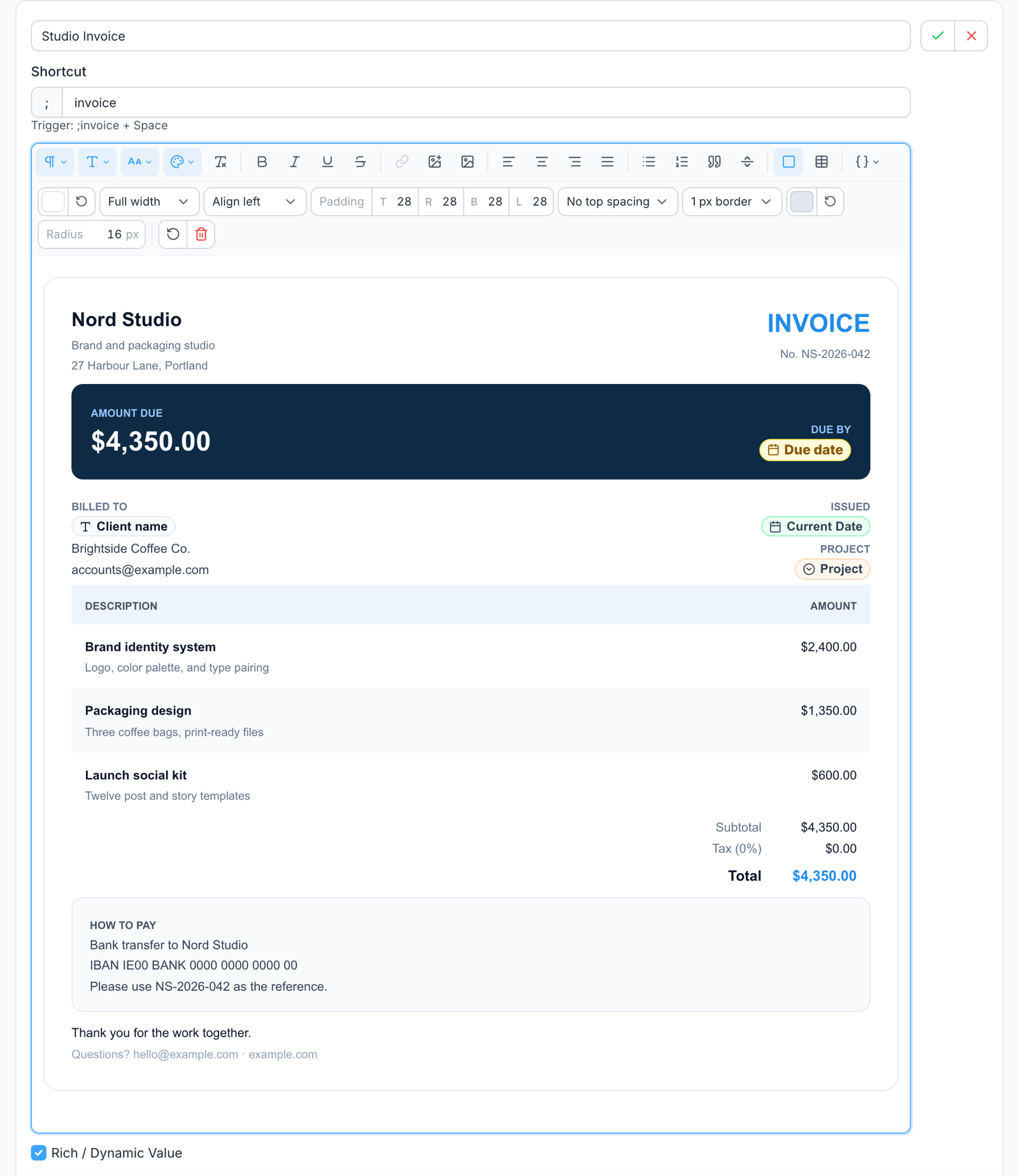
Designing an invoice template in SimpleFill's editor. Field pills fill in the due date, client name and project when it expands.
2. Bitwarden
Bitwarden is an open-source password manager with a Safari extension.
Solves: remembering unique, strong passwords for every site without reusing them.
- Key features:
- End-to-end encrypted vault
- Sync across Mac, iPhone, Windows, Android and other browsers
- Password generator
- Free plan with unlimited passwords on unlimited devices; Premium is $19.80/year
- Self-hosting option
3. Noir
Noir adds a dark mode to every website in Safari.
Solves: bright pages at night, and sites that don't offer a dark theme of their own.
- Key features:
- Generates a custom dark style for each site based on its colors
- Follows your Mac's Dark Mode by default, with per-site overrides
- Over 20 built-in themes, or create your own
- Doesn't collect your browsing data
- One-time purchase: $3.99 on the Mac App Store
4. Vinegar
Vinegar replaces YouTube's player with Safari's standard video player.
Solves: YouTube ads, missing picture-in-picture, and a heavy player.
- Key features:
- Removes ads from YouTube videos
- Restores picture-in-picture
- Plays in the background when you choose audio-only quality
- $1.99 one-time on the App Store
5. Grammarly for Safari
Grammarly checks spelling, grammar and tone as you write on the web.
Solves: typos and unclear sentences in emails, posts and forms.
- Key features:
- Real-time spelling and grammar corrections
- Tone and clarity suggestions
- Works in most text fields on the web
- Free plan; Pro adds more suggestions and AI features (shown as €12/month in our EU region)
Note: Safari now only accepts the Mac App Store version of Grammarly. If you installed it from Grammarly's site years ago, reinstall it from the App Store and open the app once to enable the extension.
6. Userscripts
Userscripts runs your own JavaScript or CSS on the sites you visit.
Solves: sites that are missing a feature you need, or that show elements you want gone.
- Key features:
- Open source, with no tracking
- Redirect pages, restyle sites or hide elements
- Custom ad blocking and code or style injection
- Free
7. Super Agent
Super Agent fills in cookie consent pop-ups for you.
Solves: the cookie banner that interrupts almost every website.
- Key features:
- Set your choices for advertising, functional and performance cookies once
- Applies them automatically on thousands of supported sites
- Report sites that don't work so they get covered
- Free on the App Store for Mac (macOS 14 or later), iPhone and iPad, with an optional in-app upgrade
8. StopTheMadness Pro
StopTheMadness Pro stops websites from breaking normal browser features.
Solves: sites that block copy and paste, right-click menus, AutoFill or keyboard shortcuts, plus link tracking.
- Key features:
- Restores text selection, copy and paste, contextual menus, AutoFill and ⌘-key shortcuts
- Removes tracking parameters from URLs automatically
- Stops Google AMP pages and some clickjacking
- Syncs settings over iCloud; works in Safari, Chrome and Firefox on macOS 14 or later
- $14.99 on the App Store, which also covers Safari on iPhone and iPad
It's not an ad blocker, so it pairs well with the next one.
9. AdGuard Mini
AdGuard Mini for Mac is the new name for AdGuard for Safari: a redesigned Safari ad blocker.
Solves: ads that slow pages down and trackers that follow you between sites.
- Key features:
- Blocks banners, video ads, pop-ups and autoplay video
- Blocks trackers and analytics beacons
- Hides annoyances such as cookie notices, social widgets and sticky bars
- Element picker, custom filter lists and your own rules
- Free on the Mac App Store; advanced features are an optional in-app purchase
Conclusion
Start with SimpleFill if you write emails, replies or forms in Safari every day: it turns your most-typed text into shortcuts, your forms into one-click fills and your writing fixes into AI actions. Add a password manager and an ad blocker, then the extensions that fix the annoyances you hit most: Noir for late nights, Super Agent for cookie banners and StopTheMadness Pro for sites that fight your browser. Each extension can read the pages you allow it to, so install only the ones you need and review their website permissions in Safari's settings. For more time-saving picks, see our time-saving Safari extensions list.
Catch these apps on sale: many paid Mac apps, including Safari extensions, run discounts at least once a year, most often around Black Friday. Subscribe to the Apps.Deals newsletter to hear when the deals arrive.
Note: First published in April 2025 and updated in October and November 2026. Features and prices were checked in October 2026 (SimpleFill's in November 2026) and can change; verify them on each official site or the App Store before buying.
Disclosure: SimpleFill is made by Softal, the same company behind Apps.Deals.
Presentify: Draw, highlight, and zoom on your Mac screen.
Annotate your screen, highlight your cursor, spotlight key areas, and zoom in during presentations, demos, tutorials, and screen shares.