Fluent vs BoltAI vs Kerlig vs Vinaa: Best AI App for Mac
Most people use AI on a Mac the slow way: copy text, switch to a browser tab, paste it into ChatGPT, copy the answer back. A native AI app fixes that. Some work as a system-wide assistant: you press a shortcut in any app, it picks up what you selected or what's on screen, and the answer lands back where you were typing. Others give you one fast, organized home for every AI chat, with any model you like.
Fluent is the most ambitious system-wide assistant and has been shipping fast: version 2.0 arrived on September 30, 2026, and 2.3 added background "teammates" on October 25. BoltAI is the established all-in-one AI workspace, Kerlig is the focused writing assistant, and Vinaa is a new, beta-stage chat app built around organizing your conversations. All four are native Mac apps, all four can be bought once instead of rented, and all four let you choose your own AI models. They differ in what they're built around.
Quick Verdict
- Choose Fluent if you want the most capable assistant that works on top of every app: context-aware Smart Panel, memory, computer use, scheduled actions and background teammates, with lifetime upgrades from $49.
- Choose BoltAI if you want a full AI workspace: projects, agents, chat tabs, deep model controls, cloud sync and an iPhone and iPad app, plus quick system-wide access.
- Choose Kerlig if you mostly write: emails, Slack replies, tickets and proofreading, in a simpler app that also runs on Intel Macs and older macOS versions.
- Choose Vinaa if you mainly chat with AI and want those chats well organized: projects, nested folders, full-text search and ChatGPT and Claude history import, for a $40 launch price with lifetime updates.
Feature Comparison
| Feature | Fluent | BoltAI | Kerlig | Vinaa |
|---|---|---|---|---|
| Best for | AI on top of every app, plus automation | All-in-one AI workspace | Writing and replies | Organized AI chats |
| Price (1 Mac) | $49 with lifetime upgrades, or $29 with 1 year of upgrades | $79 with 1 year of updates | $49 with lifetime updates | $40 launch price with lifetime updates ($80 after beta) |
| 2 Macs | $69 | $99 (plus 1 mobile device) | $79 | $70 ($30 per extra Mac) |
| Works over other apps | Yes, Smart Panel | Yes, global shortcut | Yes, on selected text | No, chat window |
| ChatGPT or Claude plan | Yes | Yes (via CLI providers) | No, API keys | No, API keys |
| Local models | Apple Intelligence, built-in MLX models, Ollama, LM Studio | Ollama, LM Studio | Apple Foundation Models, Ollama, LM Studio | Ollama, LM Studio, Apple Foundation Models (macOS 27) |
| MCP | Yes, 12 built-in integrations | Yes | Yes (Agentic Mode) | Yes |
| Acts in other apps | Computer Use, Finder file actions | Inline editing of selected text | Inserts results back into apps | No |
| Sync and mobile | No | BoltAI Cloud, iPhone and iPad app | No | Optional iCloud sync, Mac only |
| Import ChatGPT and Claude history | No | No | No | Yes |
| On Setapp | No | Yes | Yes | No |
| Trial and refund | 7-day trial, 14-day refund | Free trial, 30-day refund | 14-day refund | Free beta, 30-day refund |
| Requires | macOS 14.2 or later | macOS 13 or later, Intel and Apple Silicon | macOS 12 or later, Intel and Apple Silicon | macOS 15 or later, Intel and Apple Silicon |
Fluent
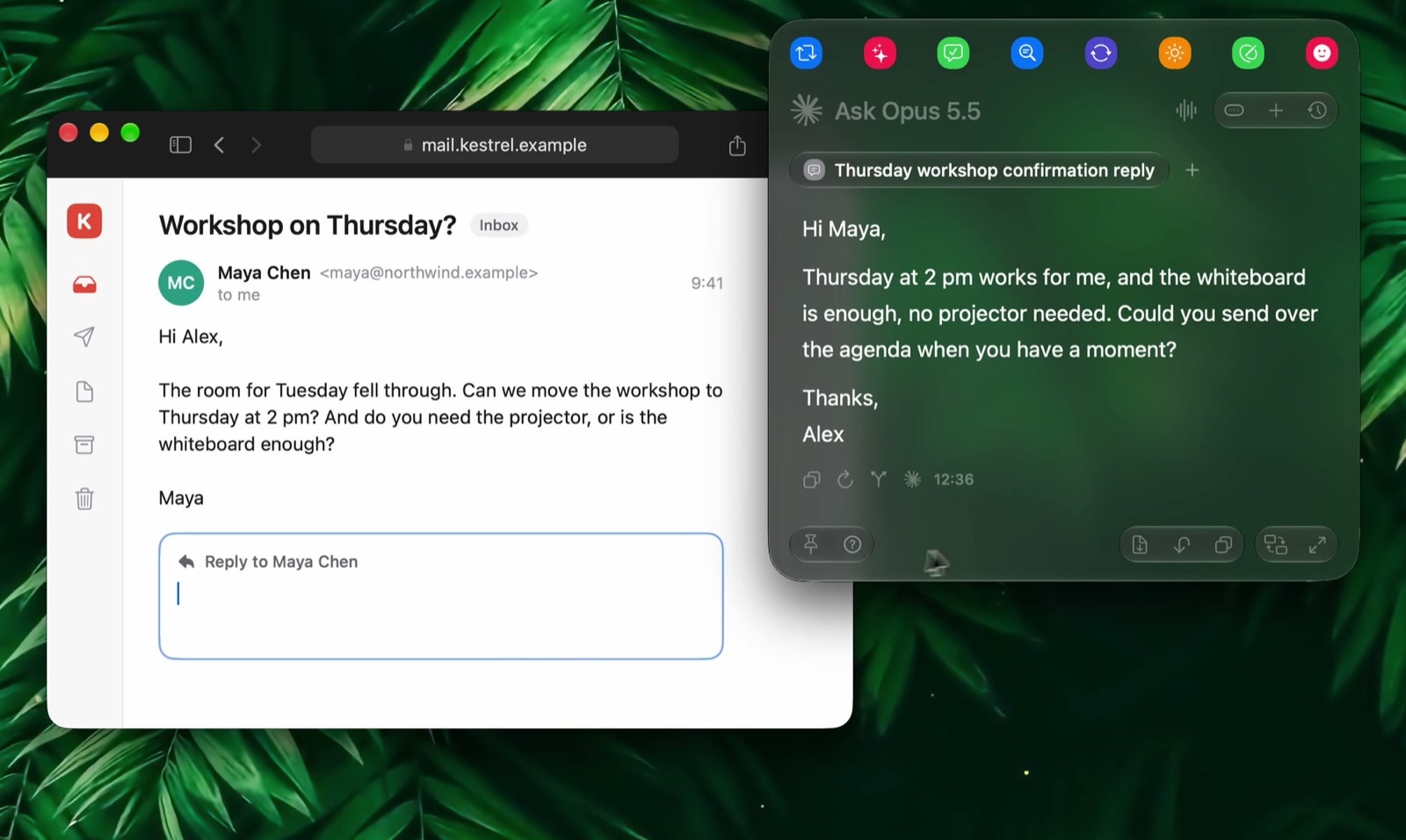
Fluent's Smart Panel writing a reply to the open email. Image: Fluent.
Fluent, made by Epic Bits in Germany, is built around the Smart Panel. Press Option-Space in any app and the panel captures the relevant context (your selection, the clipboard or the window's content), then runs an action or answers a prompt. Select a rough draft and choose Fix Grammar, and the polished version replaces it where you wrote it. Ask it to reply to a mail thread with "Thursday at 2 works, ask for the agenda", and it reads the thread and writes the reply.
What sets Fluent apart is how far past text it now goes:
- Memory: rebuilt in 2.0, it remembers facts you tell it once (your sign-off, your refund policy) and works as a private, on-device knowledge base for your files.
- Computer Use: added in 2.1, Fluent can click through apps with a pointer of its own while you keep using your mouse. In Finder, a sentence like "sort this folder into invoices, screenshots and installers" moves the files for you.
- Council: sends the same question to several models and has them review each other's answers.
- Scheduled actions and Team: you can ask for a daily brief and Fluent schedules it, waking your Mac to have it ready. Version 2.3 adds Team (beta): "teammates" that run a job on their own, such as drafting replies to emails that need you or warning you before a free trial charges, starting from 29 templates.
- MCP: 12 built-in integrations (Finder, Calendar, Reminders and more) and access to a large catalog of external MCP servers.
On models, Fluent supports OpenAI, Google, Anthropic, Grok, Mistral, OpenRouter, Straico and Apple Intelligence, plus Ollama, LM Studio, any OpenAI-compatible provider and local MLX models you can download inside the app. Since 2.0 you can also use the ChatGPT or Claude plan you already pay for instead of API keys. Fluent says it collects no telemetry, runs no cloud servers apart from license checks, and stores your history encrypted on your Mac.
Pricing: Fluent is a one-time purchase. Basic costs $49 for 1 Mac with lifetime upgrades, or $29 with 1 year of upgrades (you can add lifetime upgrades later for $39). Standard is $69 for 2 Macs, and Team licenses cost $29 per Mac from 3 Macs. Prices are in USD with tax included, there's a 7-day free trial and a 14-day refund guarantee, and students and teachers get an extra 30% off. Fluent requires macOS 14.2 or later.
Limits: Fluent is changing quickly. Version 2.0 to 2.3.1 shipped in under a month, so expect occasional rough edges, and Team is labelled beta. The newest features, especially Computer Use and teammates, need Accessibility and other permissions that you should review before granting. There's no sync between Macs and no iPhone app.
BoltAI
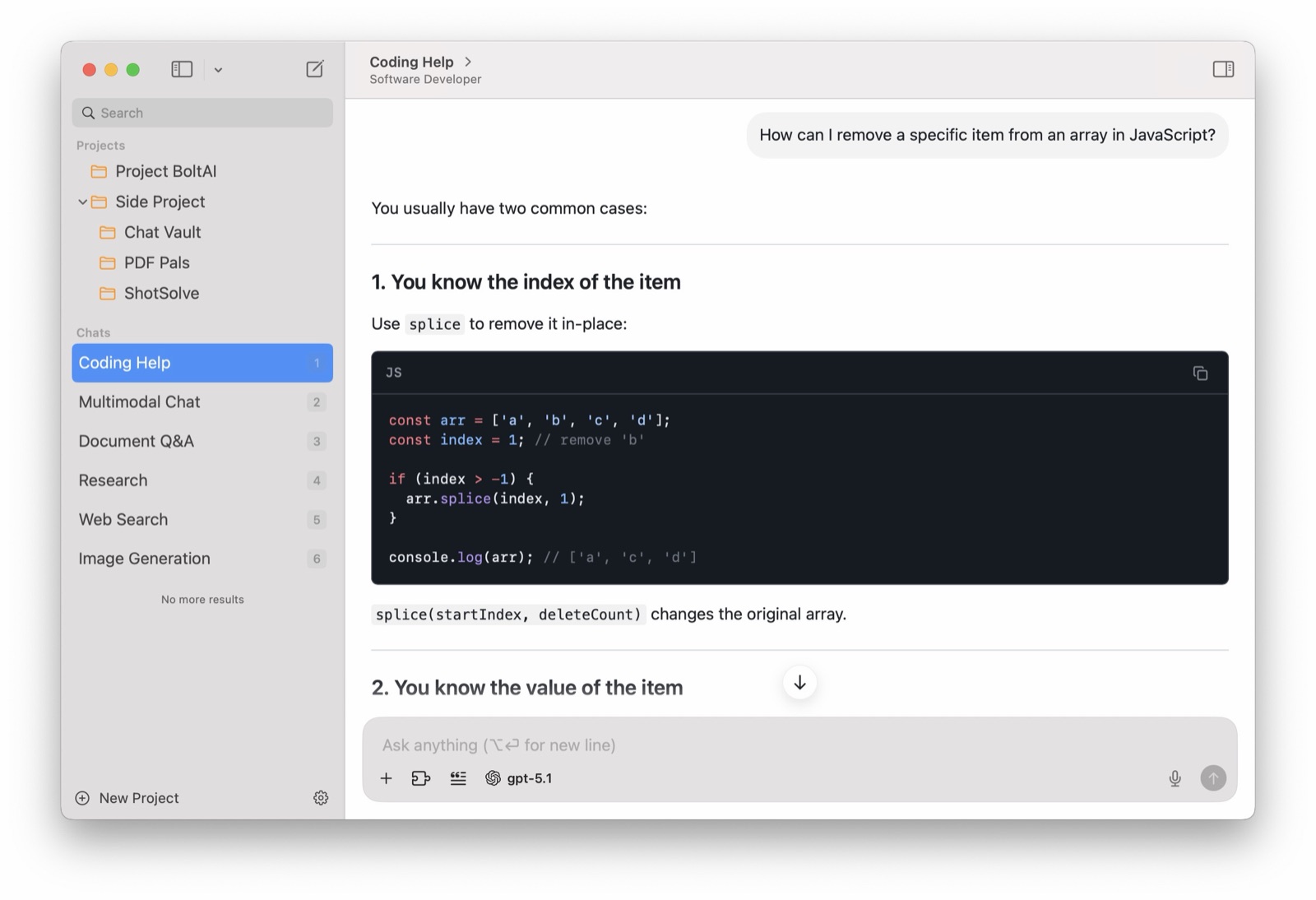
BoltAI's main window with projects and chats in the sidebar. Image: BoltAI.
BoltAI started as a native ChatGPT client and has grown into a full AI workspace. Its main window is where it shines: projects, chat tabs (on by default since 2.18.0 in October 2026), forking, reusable agents with their own instructions and knowledge, a prompt library, and fine control over temperature, max tokens and other generation settings.
It also works outside its window. A global shortcut opens BoltAI over any app to explain code, rewrite text or summarize a page, screenshots can be sent straight to a model, and dictation plus inline editing let you change selected text in place. It supports 300+ models from OpenAI, Anthropic, Google, Mistral, Azure, Bedrock and others, local models through Ollama and LM Studio, MCP tools and code execution. Like Fluent, it can use a ChatGPT or Claude subscription instead of API keys, through CLI providers such as Codex CLI and Claude Code.
BoltAI is the only app here with an iPhone and iPad app: BoltAI Cloud syncs chats, agents and projects to it. Chats are stored locally, API keys can be encrypted with a passphrase, and nothing is used for training.
Pricing: Essential is $79 for 1 Mac, Pro $99 for 2 Macs plus 1 mobile device, and Pro+ $199 for 3 Macs plus 2 mobile devices. Each is a perpetual license with one year of updates; after that you keep your last version, and renewing is optional. There's a free trial with no account required and a 30-day money-back guarantee. BoltAI is also included with Setapp. It needs macOS 13 or later and runs on Intel and Apple Silicon. Our BoltAI review goes deeper.
Limits: BoltAI has the most options of the four, which can feel like a lot if you only want quick rewrites. Updates past the first year cost extra, unlike the lifetime licenses of the other three.
Kerlig
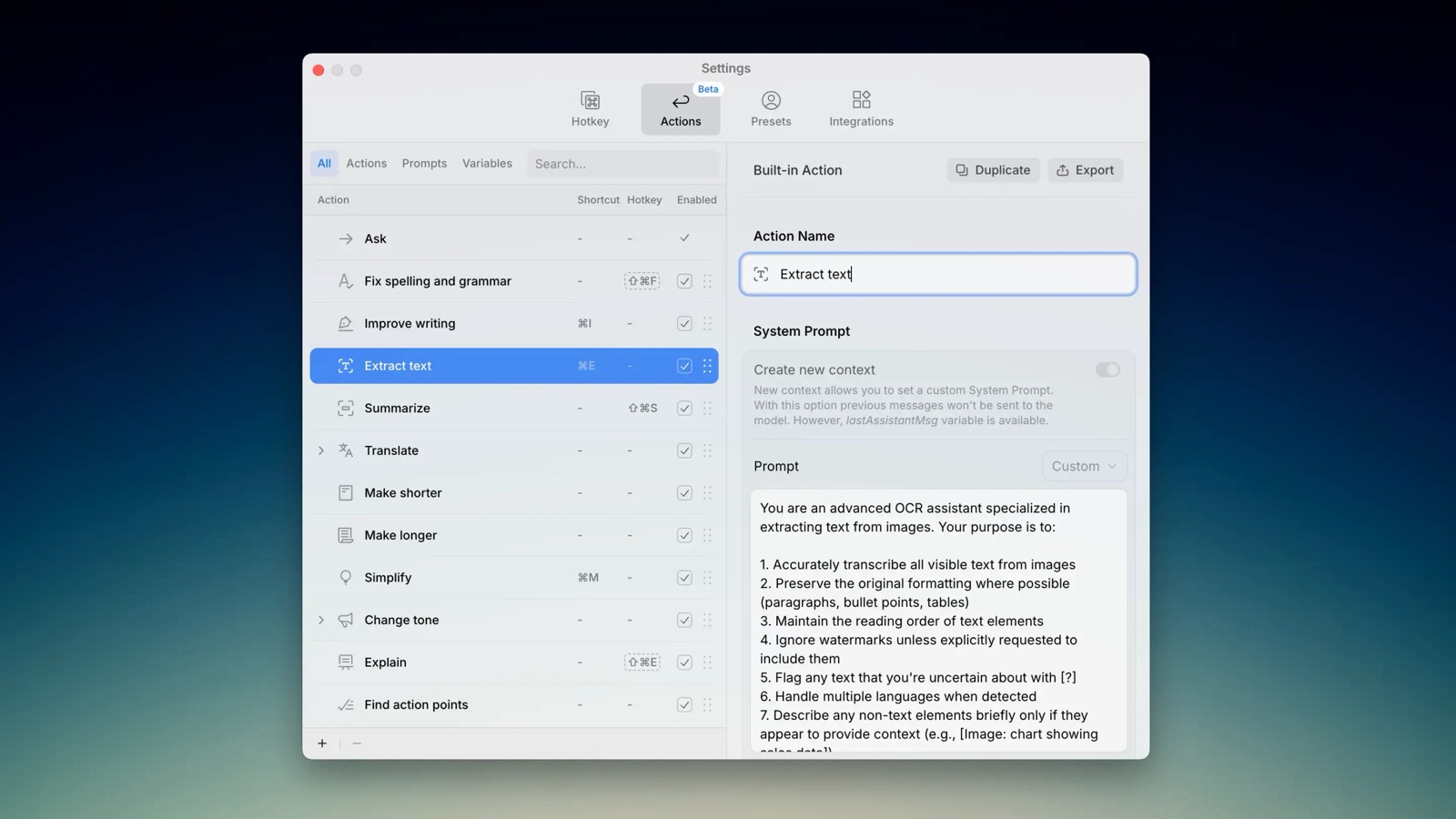
Kerlig's built-in and custom actions, each with its own shortcut. Image: Kerlig.
Kerlig keeps a narrower focus: saving time on written communication. Select text in any app, open Kerlig with a shortcut, and run an action such as Fix spelling and grammar, Improve writing, Summarize or Make shorter, or write a Slack reply or Jira ticket. You can create your own actions and presets, set a tone of voice, chat with documents, webpages and images, and insert the result back into the app you came from. Version 2.7 made it read your selection directly in most apps, leaving your clipboard alone.
Kerlig 2.8 (August 2026) added Agentic Mode and MCP: when you allow it, the AI can read the window you're working in, fetch links, check your clipboard, search past chats and use MCP servers such as Notion or Linear, asking for approval the first time each tool runs. Quick actions stay fast and cheap because tools only switch on when you want them.
Kerlig works with your own API keys for OpenAI, Anthropic, Google, Groq, OpenRouter, Mistral, Perplexity and others (350+ models), plus Apple Foundation Models, Ollama and LM Studio. Messages go straight to the provider and are stored encrypted on your Mac. For voice, it uses the built-in macOS Dictation.
Pricing: Basic is $49 for 1 Mac and Pro $79 for 2 Macs, both one-time with lifetime updates. A Team license costs $297 for 10 Macs and adds remote deployment through the command line. There's a 14-day money-back guarantee, VAT may apply, and Kerlig is also available through Setapp. It supports macOS 12 or later on Intel and Apple Silicon, the widest range here. Version 2.8.4 shipped on September 23, 2026.
Limits: Kerlig needs API keys; it can't use a ChatGPT or Claude subscription. It doesn't act in other apps on its own, schedule tasks or sync, so it's a writing tool more than an assistant that does work for you.
Vinaa

Vinaa's three-column layout: projects and folders, chats, and the conversation. Image: Vinaa.
Vinaa is the newest app here, made by an independent developer in New Zealand and still in beta (version 0.1.9 shipped on October 23, 2026). It doesn't try to work inside other apps. Instead it aims to be the best place to have, and find again, your AI conversations.
Organization is the core idea. Chats live in projects with nested folders, and Vinaa can file new chats into the right folder for you. You can keep projects open in separate windows with chats as tabs, jump to any message or heading in a long answer, and, since 0.1.9, search the text of every message across all chats. Each project can have its own default model, tools and prompt templates, and saved prompts take placeholders and are inserted by typing /. You can import your history from ChatGPT and Claude, export chats whenever you like, and turn on optional sync through your private iCloud account.
On models, Vinaa uses your own API keys for OpenAI, Anthropic, Google, Mistral, xAI, DeepSeek, OpenRouter, Groq and others, any OpenAI-compatible API, and local models through Ollama and LM Studio. On macOS 27 it can also run Apple's on-device model for free. It supports web search and MCP tools, with a Tool Finder that loads the right tools when needed. Chats are stored on your Mac, keys sit in the macOS Keychain, and requests go straight to the provider you pick. It's built with SwiftUI and AppKit rather than a web view.
Pricing: Vinaa Lifetime costs $40 for 1 Mac at its launch price, with every future update included; Vinaa says the price rises to $80 when the beta ends. Extra Macs cost $30 each. The beta is free to download and use, and there's a 30-day refund. It requires macOS 15 or later on Intel or Apple Silicon.
Limits: Vinaa is a young, beta-stage app from a solo developer, so expect missing features and changes. It has no system-wide panel, can't act in other apps, can't use a ChatGPT or Claude plan, and has no iPhone app. If you want AI inside every app, pick one of the other three.
What About Raycast and Apple Intelligence?
Raycast also puts AI behind a shortcut, but Raycast AI is only included in its paid Pro plans, which are subscriptions with monthly AI credits. It's a good pick if you already live in Raycast; our macOS AI clients comparison covers it. Apple Intelligence's built-in Writing Tools are free and private for basic proofreading and rewriting on supported Macs, so try them before buying anything if that's all you need. For a selection menu with AI actions rather than a full assistant, see our PopClip alternatives.
Which One Should You Choose?
Choose Fluent if...
- You want AI in every app with real context: the selection, the window or an email thread.
- You'd like the assistant to do work, not just write: sort files, click through apps, run scheduled briefs or background jobs.
- You want lifetime upgrades and the option to use your ChatGPT or Claude plan, a local model or Apple Intelligence.
Choose BoltAI if...
- You spend long sessions in an AI chat app and want projects, agents, tabs and model controls, plus system-wide access.
- You want your chats on your iPhone and iPad too.
- You'd rather get it through Setapp, or want a long refund window (30 days).
Choose Kerlig if...
- Most of your AI use is proofreading, rewriting and replying in Mail, Slack and similar apps.
- You use an Intel Mac or a macOS version older than 14.2.
- You prefer a simpler app with lifetime updates and are happy to use API keys.
Choose Vinaa if...
- You mostly chat with AI and want hundreds of conversations organized and searchable.
- You're moving off ChatGPT or Claude and want to bring your history with you.
- You want the lowest one-time price with lifetime updates and don't mind a beta.
Final Verdict
Fluent is the most ambitious of the four and, for most people who want an assistant that works across their whole Mac, the best value: $49 for lifetime upgrades, the broadest model choice, and features like Memory, Computer Use and Team that the others don't match. The trade-off is pace; parts of it are new or in beta. BoltAI is the better choice if you think of AI as a workspace you return to all day, especially across a Mac and an iPhone. Kerlig is the calm, focused option for writers and anyone on older hardware. Vinaa is the one to watch if your AI use is mostly chat: it's young, but its organization and price already stand out.
All four have a trial, a free beta or a refund window, so the cheapest way to choose is to try Fluent and whichever of the others matches how you work, for a week each.
Catch these apps on sale: many paid Mac apps, including AI assistants, run discounts at least once a year, most often around Black Friday. Subscribe to the Apps.Deals newsletter to hear when the deals arrive.
Features and prices are current as of October 2026 and may vary by region. Screenshots are from each developer's website.
Disclosure: This post contains affiliate links for Fluent, BoltAI and Setapp; if you buy through them, we may earn a commission at no extra cost to you.

Presentify: Draw, highlight, and zoom on your Mac screen.
Annotate your screen, highlight your cursor, spotlight key areas, and zoom in during presentations, demos, tutorials, and screen shares.